Draft prose with Scene Beats
A Scene Beat is an instruction block inside a scene. You write what should happen, then choose a prompt and model to draft prose. The Beat remains an authoring control; it is excluded from manuscript prose exports.
Prepare a Beat
- Configure an AI connection, enable a model, and make a Beat Completion prompt available. You can use a library prompt or create your own.
- Open a scene and put the cursor where you want the next passage.
- Type
/beatand choose Scene Beat from the block commands. - Write a concrete instruction, such as “Mara finds the missing parcel under the pier, but the seal has already been broken.”
- Select the prompt and model using the Beat's controls. Fill any required prompt inputs, such as tone or desired length.
The prompt determines which context is sent. It can use the Beat instruction, prose before it, scene/novel settings, summaries, and relevant Lore. Open the prompt's tweaker and Preview to inspect the rendered messages for the current Beat. A context estimate helps assess size; it is not an exact provider bill.
Generate and inspect
Choose the prompt's main execution button in the Beat. Generated text appears as a preview in the scene, with generation controls. Wait for a completed result before deciding whether to apply it.
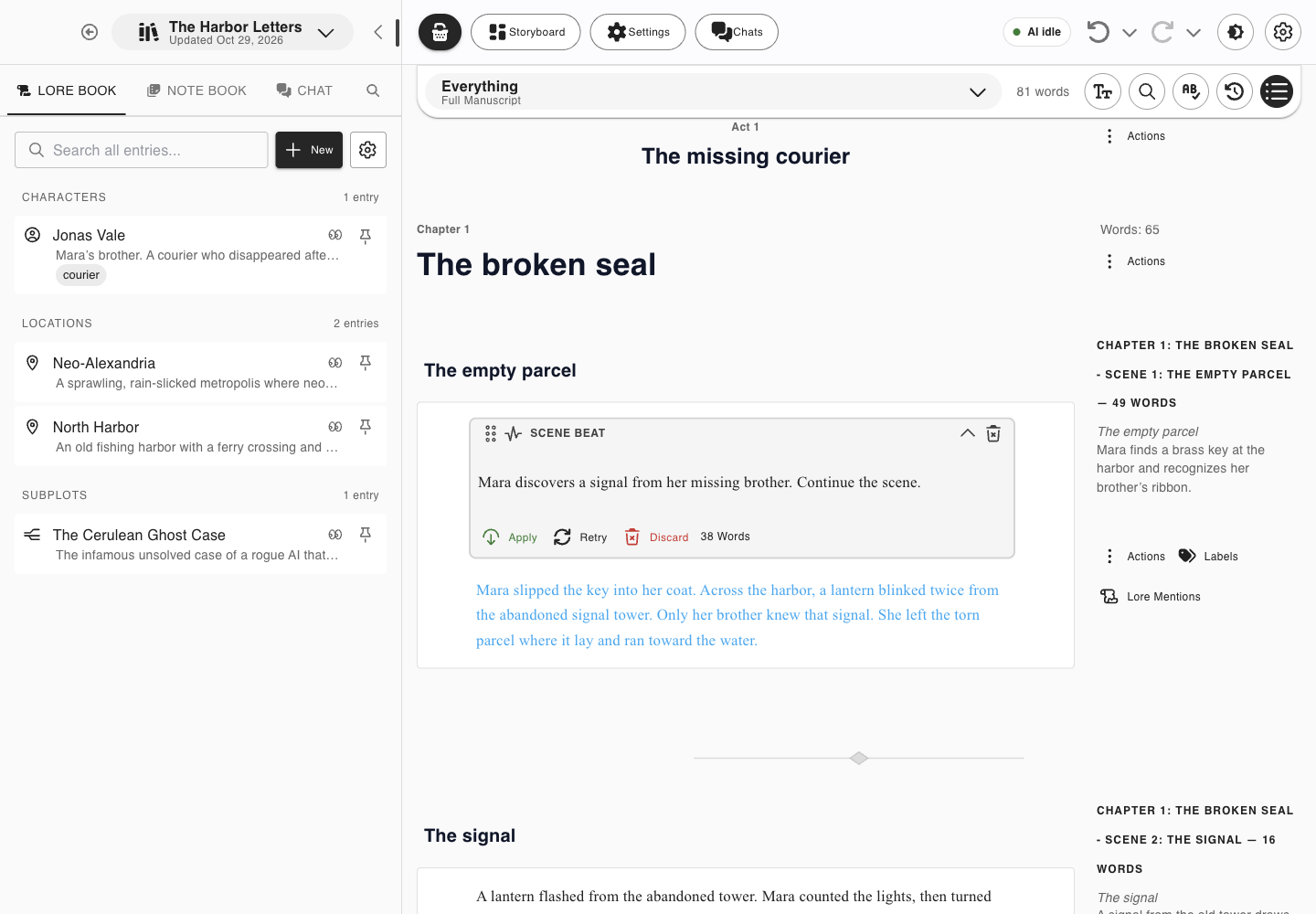
| Control | Use |
|---|---|
| Stop | End the current request. Inspect the available result and controls afterward. |
| Retry | Request another result; this can incur another provider charge. |
| Apply | Accept the preview into your manuscript. |
| Discard | Remove the current generated preview. |
Inspect continuity, voice, POV, and factual details before Apply. A length input is a prompt instruction, not a guarantee of an exact output length. Applied prose can participate in automatic summary updates and undo/revisions.
Keep the instruction separate from prose
Use the Beat's menu when you want to hide its controls, clear its instruction, or delete the Beat. Read each action carefully: clearing text up to the next Beat or scene end affects prose, whereas clearing the Beat instruction is a different operation.
To revise existing prose rather than extend an instruction, use Rewriting. Generating a novel outline creates scene planning and Lore; it does not automatically run all the Beats or write a complete manuscript.
Resolve a blocked request
If the prompt or model is unavailable, choose a replacement. The saved selection and input values remain available for inspection; opening the scene does not silently select another provider. If no models are available, open AI connections and enable or configure one.
For a provider or context-limit error, inspect the message, check the connection/model, or reduce the selected context before retrying. An unknown context estimate does not establish that the request fits. Hide from AI sections are omitted from the app's extracted manuscript context.
Ordinary editing remains available without an AI provider. A novel currently locked by an active generation workflow must reach an editable state before you can change its manuscript.